 EnglishFlow AI
Dual subtitles on YouTube, in your language
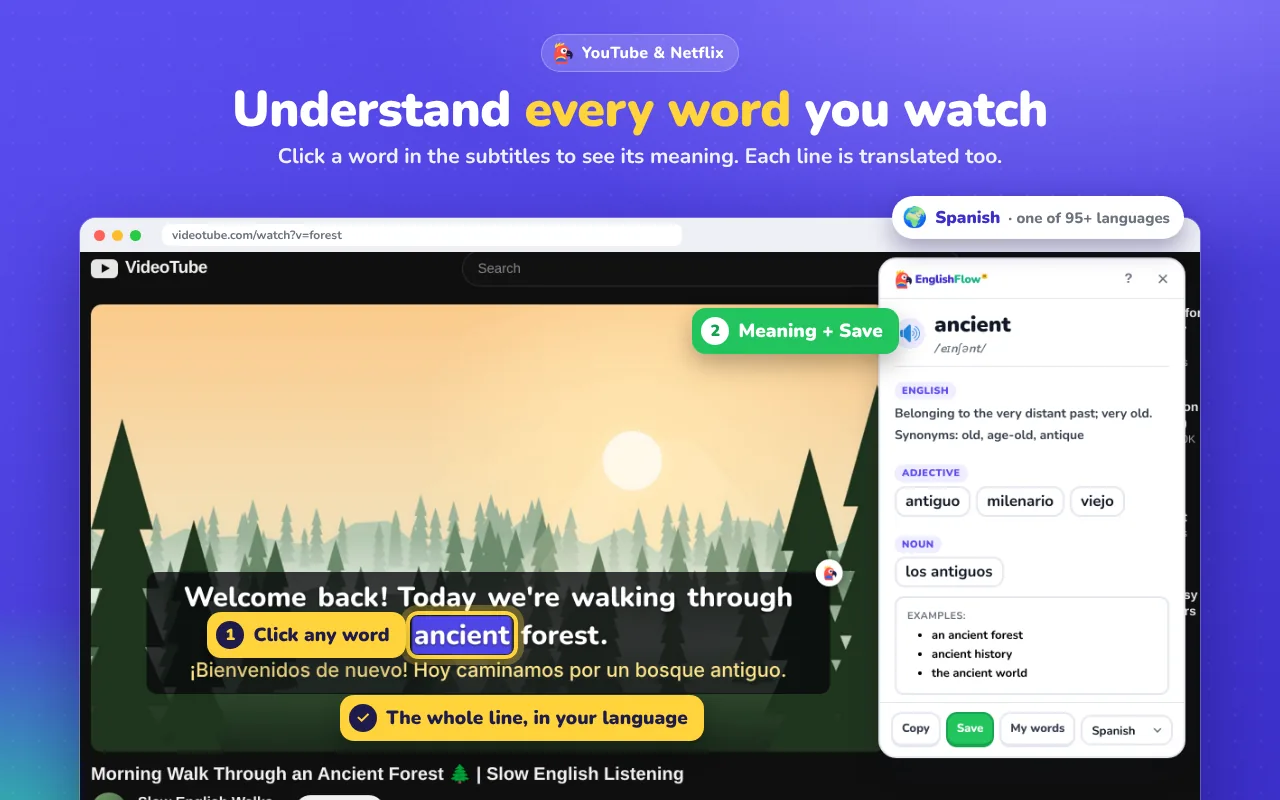
YouTube can only show one subtitle language at a time. EnglishFlow AI adds a translated line under every English subtitle, and makes every word clickable.
★★★★★ 5.0 on the Chrome Web Store95+ languagesFree to start
What are dual subtitles?
Dual subtitles show two lines at the same time: the original English and a translation in your language. You read the English, and glance at the translation only when you need it. It's one of the easiest ways to understand more while still learning.
How to turn on dual subtitles on YouTube
- Add EnglishFlow AI to Chrome (free).
- Choose your language on the welcome page.
- Open a YouTube video and turn on English captions (CC). Auto-generated captions work too.
- The translated line appears under each English line. Hover to pause, click any word to see its meaning.
More than two lines
- Clickable words with meaning, synonyms and examples.
- Pronunciation for any word.
- Transcript that follows the video, so you can jump to any line.
- Save words and review them later with spaced repetition.
Frequently asked questions
Does it work with auto-generated YouTube captions?
Yes. It works with both manual and auto-generated English captions.
Which languages can the second line be in?
More than 95, including Arabic, Spanish, Chinese, Hindi, Urdu, Turkish, Russian and Portuguese.
Does it work on Netflix too?
Yes, the same dual subtitles and clickable words work on Netflix.
Try it on your next episode
Free to start. Works on Netflix, YouTube and any website.
Add to Chrome, it's free